Single Page vs Multi Page Website: Which Is Right for Your Small Business?
Compare costs, SEO and room to grow, then use a simple four-question framework to decide.

On this page
Picture this. You've just opened a small bakery, your Instagram is picking up a few likes, and now everyone says you need a website. You call a developer, and the first thing they ask is: "Single page or multi page?"
If you froze at that question, you're not alone. Choosing between a single page vs multi page website is one of the first real decisions a new small business makes online. By the end of this guide, you'll know which one fits your business, your budget and your plans.
We've built websites for small businesses since 2019, and this is the same framework we walk new clients through.
Choose a single page website if you offer one or two services and most customers find you through referrals, social media or ads.
Choose a multi page website if you offer three or more services, want customers to find you on Google, or plan to publish a blog.
In the one page vs multi page website debate, your marketing plan decides the winner.
What Is a Single Page vs Multi Page Website?
What a single page website looks like
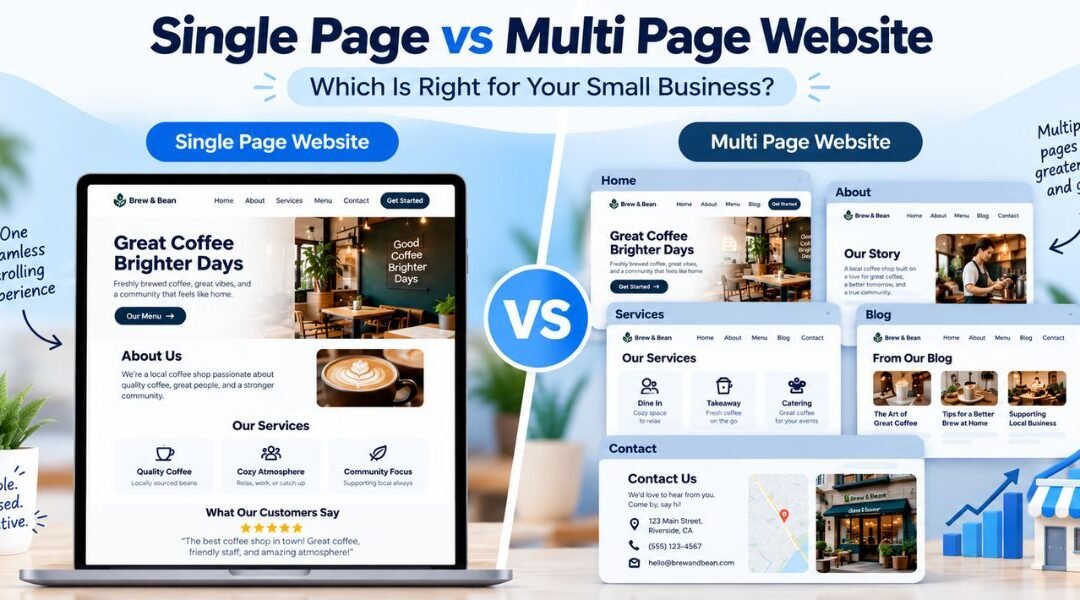
A single page website puts everything on one long, scrolling page. The menu doesn't open new pages. It jumps visitors down to sections like About, Services, Reviews and Contact. Think of it as a digital brochure.
What a multi page website looks like
A multi page website splits your content into separate pages, each with its own web address. A typical small business site has Home, About, Services, Contact and often a Blog. Each page focuses on one topic.
Quick comparison
| Factor | Single page website | Multi page website |
|---|---|---|
| Cost to build | Lower | Higher |
| Time to launch | Faster | Slower |
| Ranking on Google | One main topic | Many topics, one per page |
| Room to grow | Limited | Plenty |
| Upkeep | Easy | More pages to update |
| Best for | One offer, simple story | Several services, SEO plans |
When a Single Page Website Makes Sense
The upside
A single page website is quick to build and cheaper to launch. Visitors get your whole story in one scroll, which feels natural on a phone. There's one clear path: read, trust, contact.
The limits
Here's the catch. One page can usually rank on Google for one main topic. If you offer five services, they all compete for space on the same page. There's also no natural home for a blog, detailed FAQs or case studies.
For most single page sites, that one topic is the business name. Even those searches are changing, so it's worth knowing what AI Overviews on branded searches mean for your business.
Best for
- A freelancer or consultant with one core offer
- A home baker or new café testing the market
- An event, launch or single product
- A business that gets most customers from referrals, social media or ads rather than Google search
When You Need a Multi Page Website
The upside
Every service gets its own page, and every page gets its own chance to show up on Google. A dental clinic can have separate pages for teeth whitening, braces and emergency care. Each one can rank for people searching that exact thing. A blog adds fresh content and builds trust over time.
Google's own SEO Starter Guide notes that organizing your site logically helps both search engines and visitors understand how your pages relate to each other. That's exactly what a well-planned multi page site does. If ranking on Google is your goal, our SEO services explain how we build that structure.
Still deciding whether Google is worth the investment? Our plain-English test answers is SEO worth it for your business.
The trade-offs
More pages mean more cost, more time and more content to write. You'll also need to keep those pages updated, or the site starts to look abandoned. AI tools can help with drafting, but it's worth knowing what AI can and can't do for SEO before you rely on them.
Best for
- Clinics, law firms, salons and trades with several services
- Businesses serving more than one city or location
- Anyone planning to invest in SEO or content marketing
- Businesses that need detailed information like menus, pricing, policies or portfolios
How to Decide: A Simple Framework for Your Business
Ask yourself four questions
- How many services do you offer?
One or two points to a single page. Three or more points to multi page.
- How will customers find you?
Referrals, social media and ads work fine with one page. Google search needs multiple pages.
- Will you publish content?
If a blog is part of your plan, you need a multi page site.
- What's your budget for the next 6 to 12 months?
If it's tight, start lean and grow.
Quick guide by business type
| Business type | Our recommendation | Why |
|---|---|---|
| Freelancer or consultant | Single page | One offer, mostly referrals |
| Home baker or new café | Single page | Simple menu, social-driven |
| Event or product launch | Single page | One goal, short lifespan |
| Clinic, salon or law firm | Multi page | Several services to rank for |
| Plumber or electrician covering several areas | Multi page | Service and location pages |
| Online store | Multi page | Product and category pages |
Start small, grow later
You don't have to get it perfect on day one. Many businesses launch with a single page, then add pages as they grow. The trick is to plan your structure early, so moving to multi page later is an upgrade, not a rebuild.
Example: When One Page Stopped Being Enough
A physiotherapy clinic launched with a single page website covering About, three treatments and a contact form. It worked well for referrals. But people searching for "sports injury physio" or "back pain treatment" couldn't find the clinic, because one page couldn't rank for all of its treatments.
Running through the four questions, the clinic had three or more services and wanted new patients from Google. Multi page was the clear fit.
Home, About, a dedicated page for each treatment, Contact, and a blog for patient tips. Each treatment now has its own page that can rank for the searches patients actually make.
Not Sure Which One Is Right for You?
Every business is different, and the right website depends on your services, your customers and your budget. Book a free 20-minute website consultation with Digital Roof. We'll look at your business and tell you honestly whether one page is enough, or whether you need more.
Book My Free ConsultationWant to see what we build first? Browse our website development services.
Frequently Asked Questions
Is a single page website good for SEO?
It can work for one main topic, such as your business name or a single service. It struggles to rank for several services or locations, because each topic needs its own page.
Is a landing page the same as a single page website?
Not quite. A landing page is built for one campaign goal, like an ad or a sign-up. A single page website represents your whole business.
How much does a single page website cost compared to a multi page one?
It depends on design, features and content. A single page needs less of all three, so it usually costs less to build and maintain.
Can I switch from a single page to a multi page website later?
Yes. If your site is built on a flexible platform and planned with growth in mind, adding pages later is straightforward.
How many pages should a small business website have?
Most need at least Home, About, Services and Contact. If Google search matters to you, add one page for each main service.
Keep Reading
Ajay Hooda is the co-founder of Digital Roof, a founder-led digital marketing studio specializing in SEO, website development and content. He holds a PG Diploma in Digital Marketing and Communication from MICA, is Google-certified, and has worked with small businesses and international clients since 2019.